This year marks the launch of the workbooks I created with my colleagues for two of the year groups we teach. This was a major undertaking, requiring a whole new set of skills not only in content creation but also in editing, project management, and publishing. We used LaTeX because it is by far the leader in typesetting and document production. It is incredibly powerful, with a mature ecosystem of tools and libraries. In the end we had a file for each chapter and conditional compilation blocks meaning we could have English and French versions of the same content living together in the same files (useful when collaborating in a bilingual team and keeping the content synchronised). In the end, I would run a script to bring together all the chapters into a single document, with a table of contents for chapters at the start of the book, a table of contents of lessons per chapter, and a single PDF book for each language.
As you can see, LaTeX is a powerful tool for creating technical documents. I also use it now for producing high-quality worked solutions for my students, ensuring they have a detailed reference not just for correcting their work but also for learning from their mistakes. Because I can dictate the style and layout with templates, I can focus on the content rather than the formatting, and I can be confident that the document will be well-structured and visually appealing.
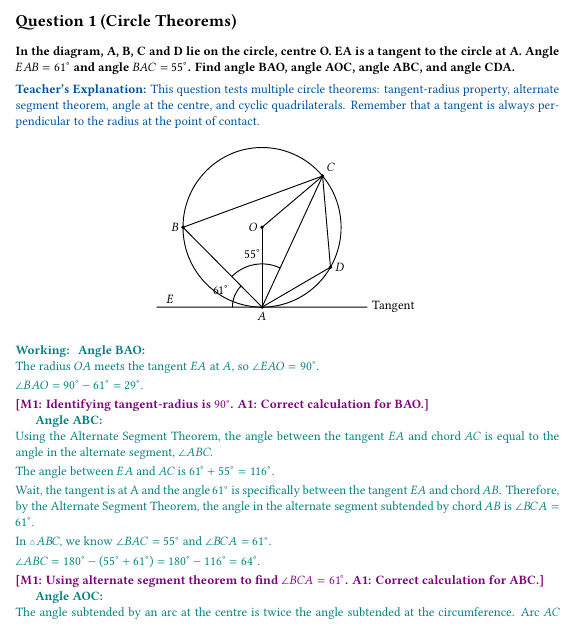
However, LaTeX has its limitations. The syntax can be cumbersome for simple formatting tasks, and the learning curve is steep for beginners. Additionally, the compilation process can be slow for large documents, and debugging errors in the code can be challenging. Enter, Typst.
My Experience So Far
Admittedly, it took me a couple of days to get my head around Typst and to stop hitting compilation errors, but once I did, I was impressed by its simplicity and elegance. The syntax is more intuitive than LaTeX, and the live preview feature allows for immediate feedback on changes. This makes it easier to experiment with formatting and layout without the need for constant compilation. Although it is still code, and any code requires learning and habituation, the code does seem cleaner overall than LaTeX. Some examples are unambiguously simpler, like the statement of the Pythagorean Theorem below.
LaTeX
\documentclass{article}
\usepackage{amsmath}

\begin{document}
\section*{Pythagorean Theorem}
For a right triangle with legs \(a\) and \(b\), and hypotenuse \(c\),
\[
  a^2 + b^2 = c^2
\]
\end{document}
Typst
= Pythagorean Theorem

For a right triangle with legs $a$ and $b$, and hypotenuse $c$,
$
  a^2 + b^2 = c^2
$
Some examples are actually longer in Typst, but there are a lot fewer backslashes, you don't need to \begin and \end every environment like in LaTeX, and for someone with experience with coding or markup languages, the syntax is intuitive enough. It may come down to personal preference in some cases.
LaTeX
\begin{center}
\begin{tikzpicture}[scale=0.8, thick]
    \coordinate (O) at (0,0);
    \draw (O) circle (3);
    \coordinate (A) at (270:3);
    \coordinate (B) at (180:3);
    \coordinate (C) at (40:3);
    \coordinate (D) at (-30:3);
    \coordinate (E) at (-4,-3);

    \draw (E) -- (4,-3) node[right] {Tangent};
    \draw (A) -- (B) -- (C) -- (D) -- (A);
    \draw (A) -- (C);
    \draw (O) -- (A);
    \draw (O) -- (C);

    \pic [draw, "$61^\circ$", angle radius=0.9cm, angle eccentricity=1.5] {angle = B--A--E};
    \pic [draw, "$55^\circ$", angle radius=1.3cm, angle eccentricity=1.25] {angle = C--A--B};

    \fill (O) circle (2pt) node[left] {$O$};
    \fill (A) circle (2pt) node[below] {$A$};
    \fill (B) circle (2pt) node[left] {$B$};
    \fill (C) circle (2pt) node[above right] {$C$};
    \fill (D) circle (2pt) node[right] {$D$};
    \node at (-3.5,-2.7) {$E$};
\end{tikzpicture}
\end{center}
Typst
#cetz.canvas({
  import cetz.draw: *
  import cetz.angle: *
  let O = (5, 5)
  let A = (5, 2)
  let B = (2, 5)
  let C = (5 + 3 * calc.cos(40deg), 5 + 3 * calc.sin(40deg))
  let D = (5 + 3 * calc.cos(-30deg), 5 + 3 * calc.sin(-30deg))
  let E = (1, 2)
  let T = (9, 2)

  circle(O, radius: 3)
  line(E, T)
  content(T, anchor: "west", [Tangent])
  line(A, B)
  line(B, C)
  line(C, D)
  line(D, A)
  line(A, C)
  line(O, A)
  line(O, C)

  // angles
  angle(A, B, E, label: [$61°$], radius: 1.2)
  angle(A, C, B, label: [$55°$], radius: 1.1)

  circle(O, radius: 0.05, fill: black)
  content(O, anchor: "east", padding: 0.1, [$O$])

  circle(A, radius: 0.05, fill: black)
  content(A, anchor: "north", padding: 0.1, [$A$])

  circle(B, radius: 0.05, fill: black)
  content(B, anchor: "east", padding: 0.1, [$B$])

  circle(C, radius: 0.05, fill: black)
  content(C, anchor: "south-west", padding: 0.1, [$C$])

  circle(D, radius: 0.05, fill: black)
  content(D, anchor: "west", padding: 0.1, [$D$])

  content(E, anchor: "south", padding: 0.1, [$E$])
})
A feature I particularly like about Typst is the dynamic, programmatic way it produces diagrams. This may well be the case in LaTeX too, but let's just say the syntax has never made it obvious to me.
You can define points and shapes using coordinates, or even through trigonometric functions (`calc.cos` gives you your x-coordinate, `calc.sin` gives you your y-coordinate). Afterwards, because the points and lines and angle labels are defined in reference to each other, moving one point dynamically updates the entire diagram, preserving the relationships. They are not simply a collection of static elements plastered on the page. This is useful if you want to make tweaks to one element without having to adjust everything else.
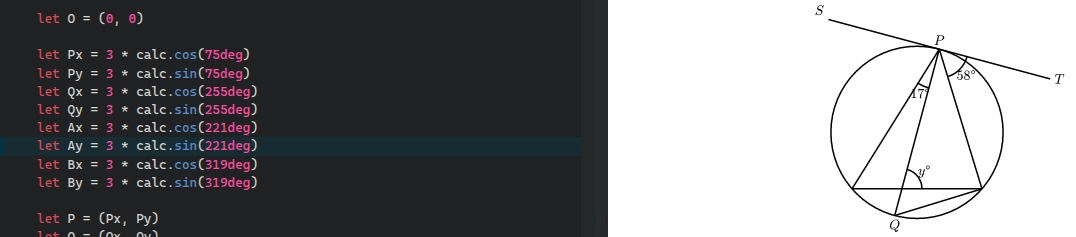
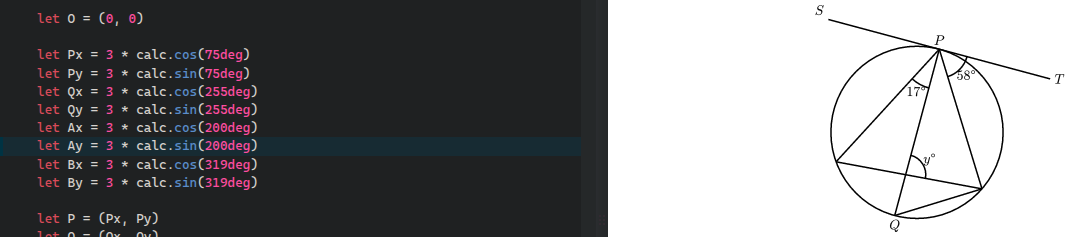
So Typst certainly has potential. There are things I like about it right off the bat and things in LaTeX I would love to see the back of. I know that Typst can do conditional compilation (so one could work on two languages at the same time). In fact, it can handle a whole host of scripting. Additionally, it looks like compiling several chapter files into one document is possible, and Typst.app provides an online interface for collaboration. So working with a team to produce a workbook may be feasible. What remains to be seen is how convenient it really is compared to LaTeX. Stay tuned because I will certainly experiment more with this interesting tool.